
Overview
The SMS Gateway integration in Taskify allows you to send real-time notifications via SMS to team members and clients. This feature is particularly useful for:
Sending task reminders to clients.
Sending project updates to external stakeholders.
Delivering urgent alerts when team members may not have internet access.
By integrating your SMS provider with Taskify, you can ensure that important updates are delivered instantly, even outside of email or app notifications.
Prerequisites
Before configuring the SMS Gateway, ensure you have the following:
An active SMS Gateway account (e.g., Twilio, Nexmo, or your local provider).
Account SID (or equivalent API key).
Auth Token (or secret key).
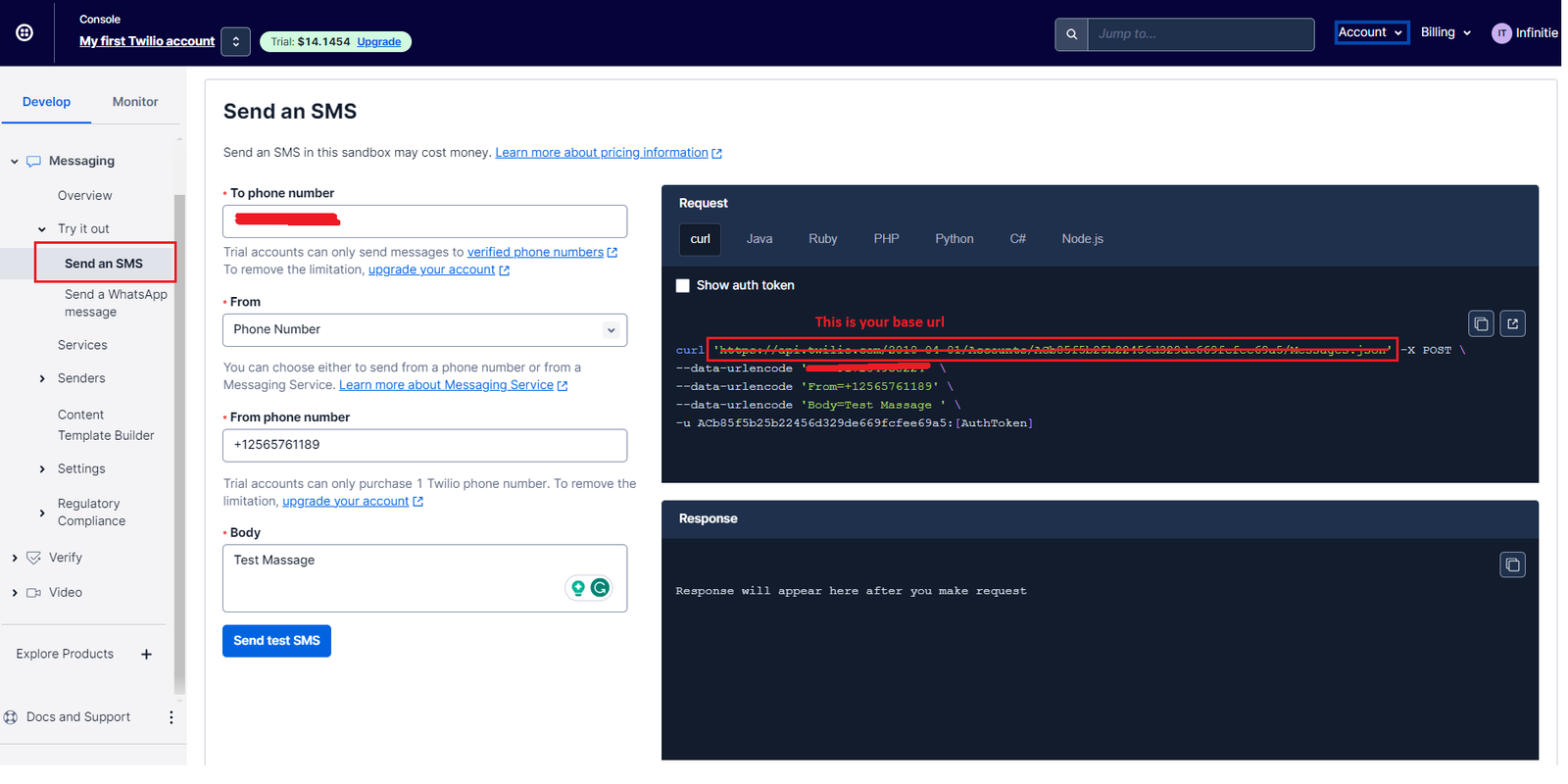
Base URL of the SMS API endpoint (usually something like
/sendor/messages).Valid SMS credits available in your provider’s account.
⚠️ Important: Without sufficient credits or a valid subscription with your provider, SMS messages will fail.
Step 1: Generate API Credentials
Log in to your SMS Gateway Provider Dashboard.
Navigate to API Keys / Credentials.
Click Generate New API Key (or equivalent option).
Copy the following:
Account SID / API Key
Auth Token / Secret Key
💡 Tip: Store these values securely. Do not share them or commit them to code repositories.
Step 2: Configure SMS Gateway in Taskify
Open your Taskify Admin Panel.
Navigate to:
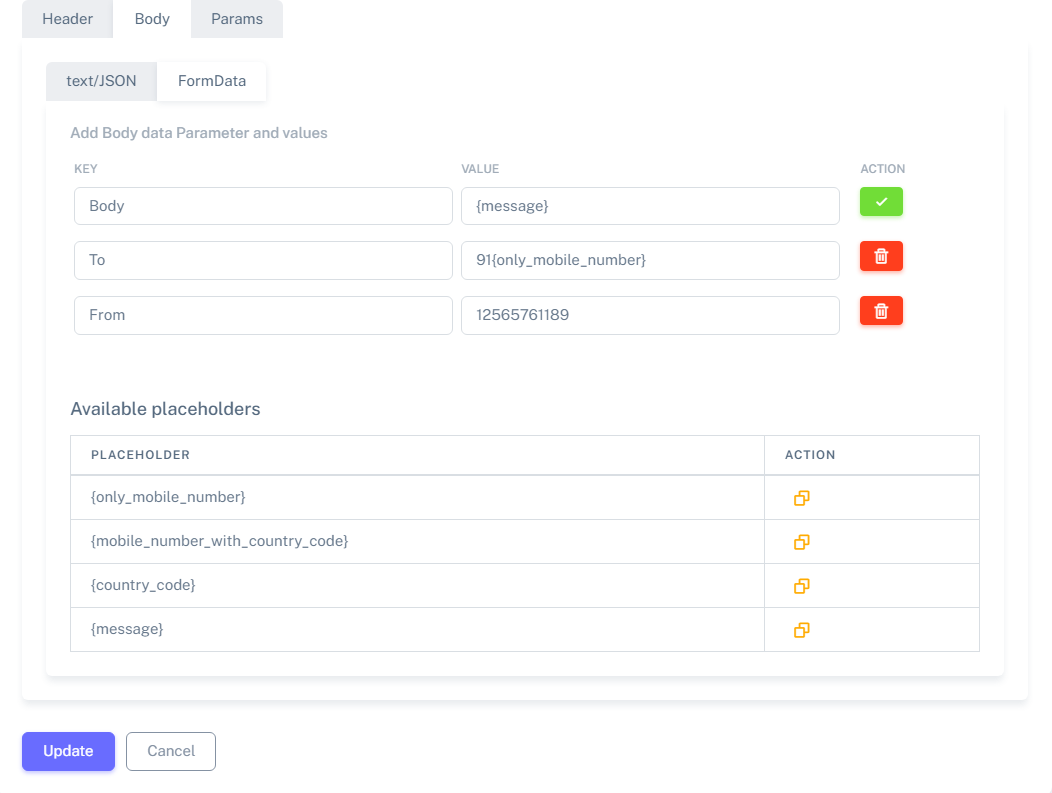
Settings → Messaging & Integrations → SMS Gateway.Fill in the required fields:
Base URL: The endpoint provided by your SMS gateway (e.g.,
https://api.twilio.com/2010-04-01/Accounts/{SID}/Messages.json).Account SID: Enter your provider’s Account SID or API Key.
Auth Token: Enter your Auth Token or Secret Key.
Click Save Configuration.
Step 3: Verify Configuration
After saving, it is highly recommended to test the integration:
In the same SMS Gateway Settings page, click Send Test SMS.
Enter a valid phone number (including country code).
Submit the test.
✅ If successful, you will see a “Message Sent Successfully” confirmation.
❌ If unsuccessful, check the error log in System Logs → Integrations → SMS Gateway.
Best Practices
✅ Always test with multiple phone numbers (domestic + international).
✅ Use environment variables (
.env) for sensitive credentials.✅ Monitor your SMS credit balance to prevent message failures.
✅ Ensure phone numbers are stored in E.164 format (e.g.,
+14155552671).❌ Do not share API keys or tokens publicly.
Common Issues & Troubleshooting
Invalid Credentials (401 Error):
Check if your Account SID and Auth Token are copied correctly. Regenerate if needed.SMS Not Delivered:
Ensure your SMS gateway supports the recipient’s country/region. Some providers block international SMS by default.Messages Delayed or Queued:
Check if your provider has throttling rules (e.g., max 100 messages/min).Wrong Base URL:
The most common mistake is entering the wrong endpoint. Always use the “Send SMS” endpoint provided in your provider’s documentation.
Security Notes
🔒 Store credentials only in the
.envfile and never in the database or code files.🔒 Rotate API tokens regularly.
🔒 If a key is leaked, revoke it immediately from your SMS provider’s dashboard.