
Overview
WhatsApp requires message templates for all outbound notifications. Unlike SMS or email, you cannot send free-form messages to users unless they have initiated a conversation with your business.
In Taskify, these templates are used for project notifications, task assignments, leave approvals, and reminders.
Step 1: Create a Message Template
Open your Facebook Developer Dashboard → WhatsApp → Message Templates.
Click Create Template.
Fill in the details:
Name: taskify_notification
Language: English
Category: Utility
In the Body, enter the message with placeholders:
{{1}}

Please take necessary actions if required.

Thank you,
{{2}}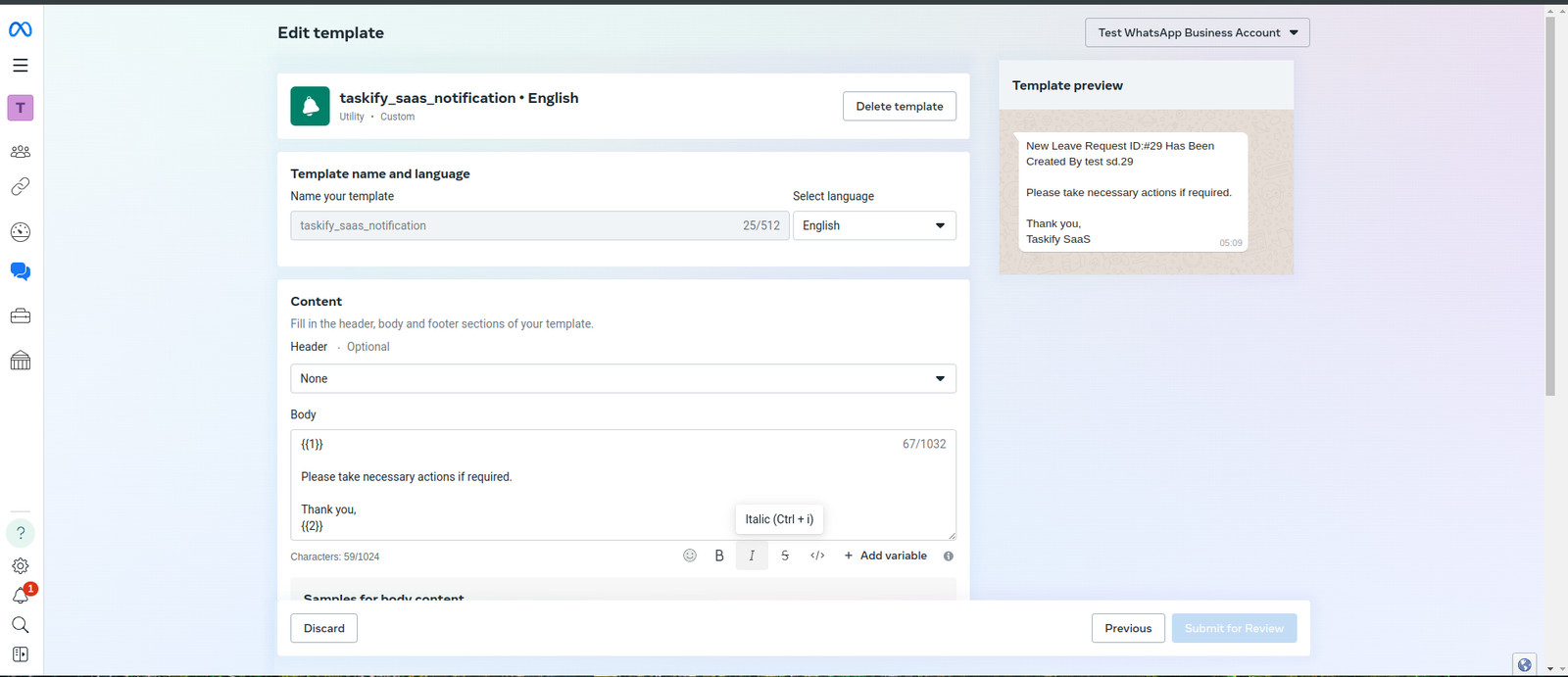
Provide sample values for placeholders when prompted:
{{1}} → “You have been assigned a new task.”
{{2}} → “Taskify Admin”
Submit for review.
💡 Templates usually get approved within minutes to a few hours.
Step 2: Use Templates in Taskify
In Taskify, when sending a WhatsApp notification, select the approved template.
Fill in variables dynamically:
{{1}} = Task or project message.
{{2}} = Sender (e.g., Manager or Taskify system).
Send notification.
Step 3: Best Practices for Templates
Keep messages short and professional.
Always include a call to action (e.g., “Please review the task”).
Test templates with multiple users before production rollout.
If your message fails, check if the template is approved and if the token is still valid.
Step 4: Troubleshooting Template Issues
Message Not Delivered: Check if the recipient has WhatsApp enabled and has not blocked business messages.
Template Rejected: Revise message to remove promotional content (only utility/transactional templates are allowed).
Token Expired: Generate a new permanent access token.
✅ Now WhatsApp subcategory is complete with 2 detailed articles:
Configuration Guide
Message Templates & Notifications