
Recurring Tasks in Taskify
Recurring Tasks in Taskify allow you to automate repetitive work by creating tasks that repeat at regular intervals. This ensures routine tasks are never missed, saving time and improving team productivity.
What Are Recurring Tasks?
Recurring tasks are tasks that repeat automatically according to a defined schedule. Examples include:
Daily stand-up meetings
Weekly status reports
Monthly audits
Annual reviews
With Taskify, you can define frequency, start date, and number of occurrences for recurring tasks.
How to Create a Recurring Task
Step 1: Open the Task Creation Modal
Navigate to the project where you want to create the task.
Click Create Task.
Fill in basic details like Task Name, Description, Assigned Members, Priority, and Task List.
Step 2: Enable Recurring Task
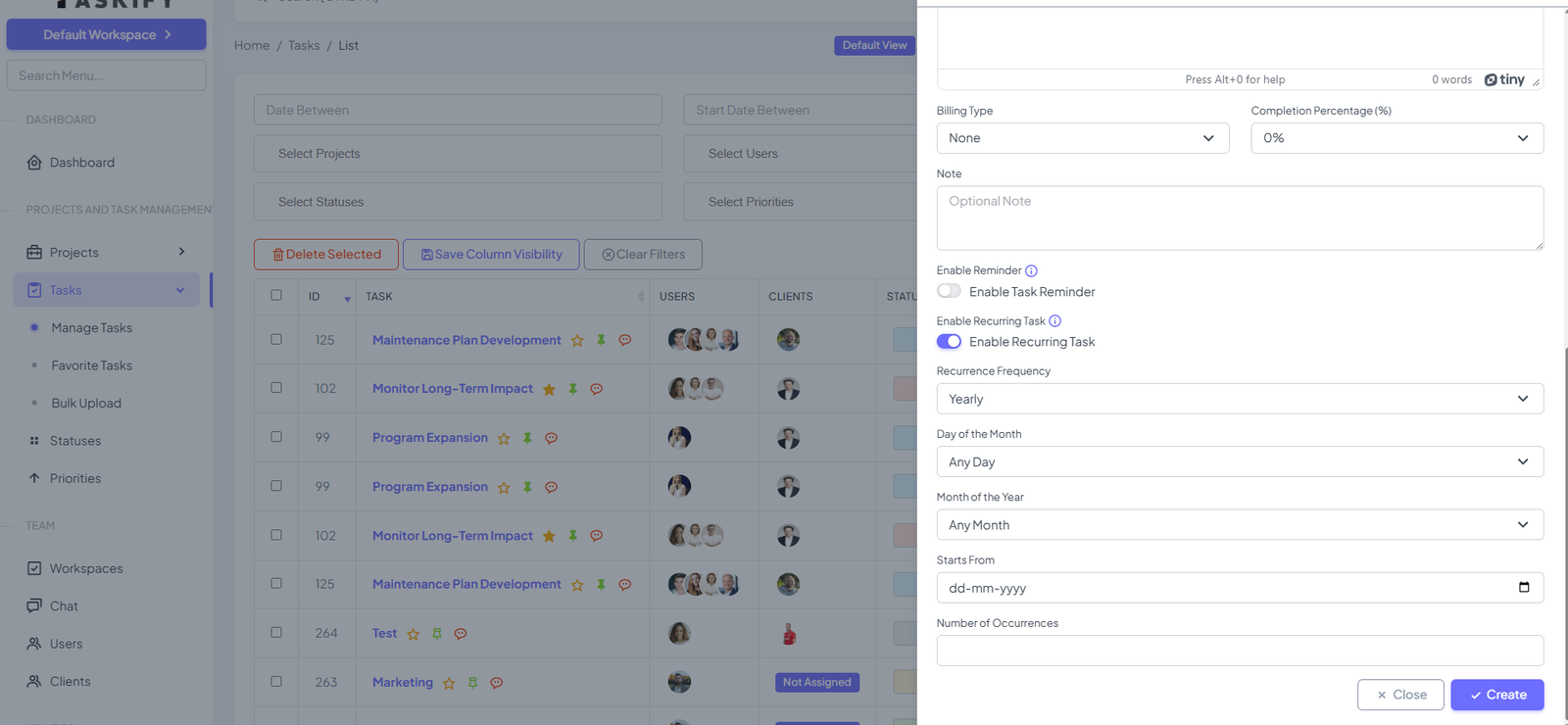
Scroll to the Enable Recurring Task toggle.
Turn it on to configure recurrence options.
Step 3: Configure Recurrence Options
Recurrence Frequency Options:
Daily: Task repeats every day.
Weekly: Task repeats on specific days of the week.
Example: Every Monday and Thursday.
Monthly: Task repeats on a specific day of the month.
Example: 15th of every month.
Yearly: Task repeats on a specific day and month each year.
Example: 15th March every year.
Additional Fields:
Starts From: The date when the recurring task should begin.
Number of Occurrences: The total number of times this task should repeat. Leave blank if it should repeat indefinitely.
Note: The Recurring Task will be created at 12:00 AM through the Cron Job.
Step 4: Save the Task
Click Create to save the recurring task.
Taskify will automatically generate future instances of the task according to your configured schedule.
Step 5: View and Manage Recurring Tasks
Recurring tasks appear in List View, Kanban View, and Calendar View.
Each instance can be edited individually without affecting future occurrences.
You can also delete a single occurrence or the entire series if needed.
Benefits of Recurring Tasks
Saves Time: Automates repetitive tasks.
Improves Productivity: Team members don’t have to manually create recurring tasks.
Ensures Consistency: Guarantees routine tasks are completed on time.
Flexible Scheduling: Supports daily, weekly, monthly, and yearly repetition with customization.
Best Practices for Recurring Tasks
Use clear and descriptive task names to easily identify recurring tasks.
Assign tasks to the right members based on responsibility.
Regularly review recurring tasks to ensure they are still relevant.
Combine with task reminders for better notification management.
✅ Summary:
Recurring Tasks in Taskify streamline repetitive workflows, ensuring teams never miss critical recurring work. With flexible scheduling options and recurrence customization, recurring tasks improve efficiency, consistency, and accountability